> ## Documentation Index
> Fetch the complete documentation index at: https://help.unrealizex.com/llms.txt
> Use this file to discover all available pages before exploring further.
# Workspace basics
> A tour of the start page: where you make things, and where they live
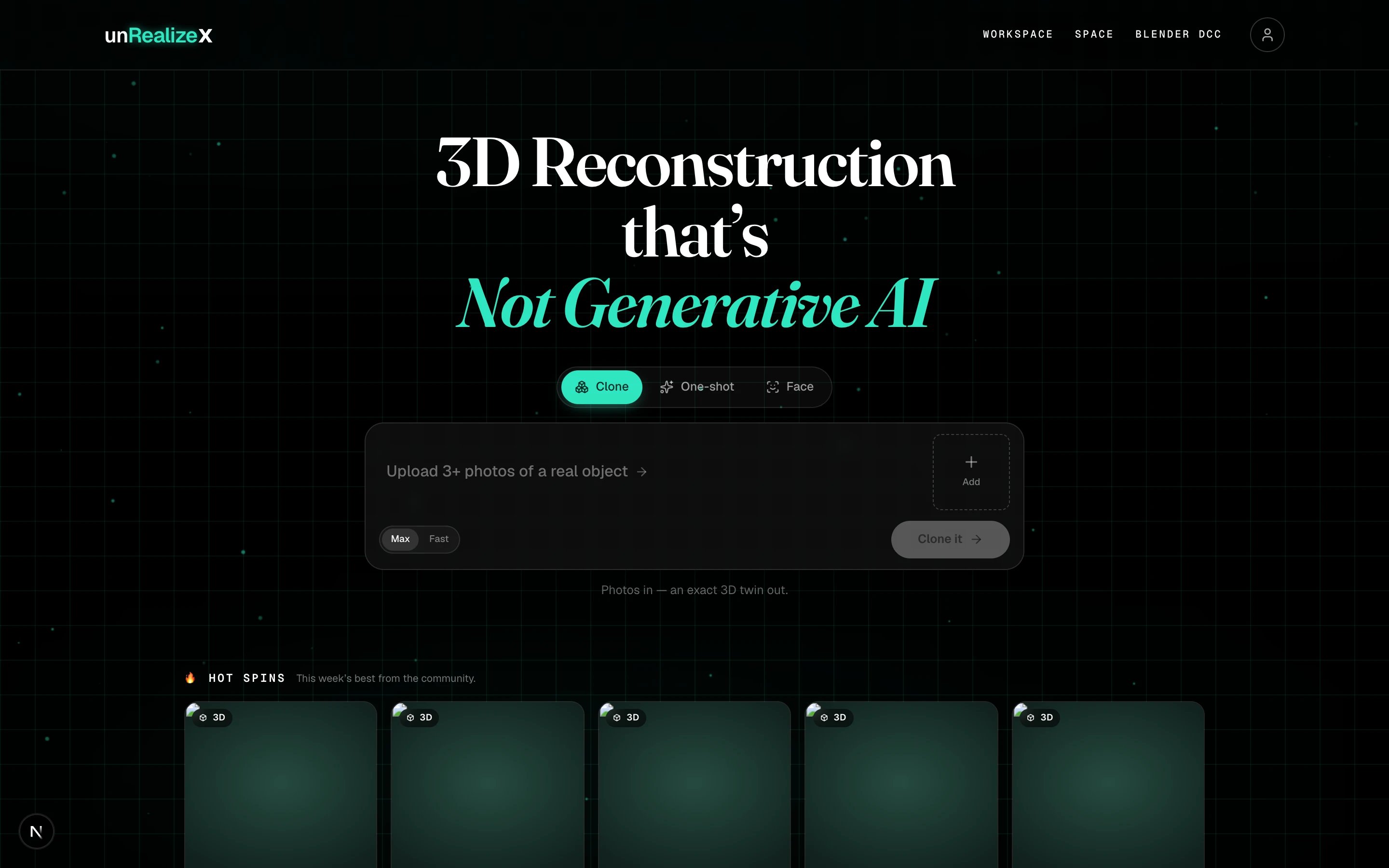 The workspace has two halves. The top is where you **make** something. Below it are **Hot spins** from the community, then **My spins**, everything you have made, next to **My Community**.
## The header
The workspace has two halves. The top is where you **make** something. Below it are **Hot spins** from the community, then **My spins**, everything you have made, next to **My Community**.
## The header
 * **Workspace**, **Space** and **Blender DCC** switch between the three places you work. Workspace is where models are born. Space is where you refine one. Blender DCC is the Blender extension page.
* The **credits pill** shows your balance. Click it for the price list, your plan, and top-ups.
* The **avatar** opens the account drawer: Workspace, Space, Blender DCC, My Community, Manifesto and My Account.
## The mode switch
Three engines, three kinds of input. The switch changes what the bar asks you for, and the line under it shows your balance and what this run will cost.
| Mode | Give it | Get back | Cost |
| ------------ | ----------------------------------- | -------------------------- | --------------------------- |
| **Clone** | 3 or more photos of one real object | An exact 3D twin | 4 credits on Max, 3 on Fast |
| **One-shot** | A prompt, an image, or a sketch | A quick generated model | 1 credit |
| **Face** | One portrait photo | A textured, rigged 3D head | 3 credits |
Whatever you make is a normal asset afterwards. Any tool in Space can be applied to any of them.
## My spins and My Community
* **Workspace**, **Space** and **Blender DCC** switch between the three places you work. Workspace is where models are born. Space is where you refine one. Blender DCC is the Blender extension page.
* The **credits pill** shows your balance. Click it for the price list, your plan, and top-ups.
* The **avatar** opens the account drawer: Workspace, Space, Blender DCC, My Community, Manifesto and My Account.
## The mode switch
Three engines, three kinds of input. The switch changes what the bar asks you for, and the line under it shows your balance and what this run will cost.
| Mode | Give it | Get back | Cost |
| ------------ | ----------------------------------- | -------------------------- | --------------------------- |
| **Clone** | 3 or more photos of one real object | An exact 3D twin | 4 credits on Max, 3 on Fast |
| **One-shot** | A prompt, an image, or a sketch | A quick generated model | 1 credit |
| **Face** | One portrait photo | A textured, rigged 3D head | 3 credits |
Whatever you make is a normal asset afterwards. Any tool in Space can be applied to any of them.
## My spins and My Community
 **My spins** lists your models, newest first, including the ones still processing. **My Community** shows what everyone has published. Folders sit between the tabs and the grid; see [Organize your spins](/organize/organize-your-spins).
Hover a card for its actions.
**My spins** lists your models, newest first, including the ones still processing. **My Community** shows what everyone has published. Folders sit between the tabs and the grid; see [Organize your spins](/organize/organize-your-spins).
Hover a card for its actions.
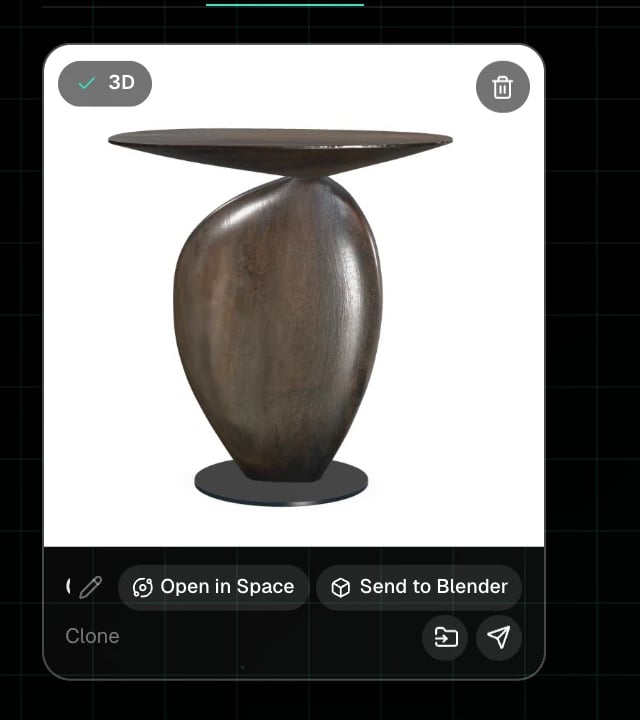 * **3D** badge: the model is finished. Click the card to open the viewer.
* **Pencil**: rename. **Trash**: delete.
* **Open in Space** and **Send to Blender**.
* **Folder** icon: move to a folder. **Share** icon: post it, or copy the link once it is posted.
Name your models while they process. Click the name line on a card and type. The default name is just the engine that made it.
* **3D** badge: the model is finished. Click the card to open the viewer.
* **Pencil**: rename. **Trash**: delete.
* **Open in Space** and **Send to Blender**.
* **Folder** icon: move to a folder. **Share** icon: post it, or copy the link once it is posted.
Name your models while they process. Click the name line on a card and type. The default name is just the engine that made it.